Skip to content

Booking app for tax assistance centers –

Booking app for tax assistance centers

Tax season without a queue out the door.

  • WhatsApp in one tap
  • Live queue
  • Start from your contacts
  • Zero commissions
  • Works with callers too
Start for free, Beta

Lock in your price now

Price after the beta: €12/monthFree during the beta

Then it stays this way forever, for your whole team. Whoever joins after the beta pays up to €34.

The beta ends in 5 months and 29 days

Your page
The client chooses
Your day

Sample business: CAF e Patronato Il Punto

From anywhere

Your client books in three taps.

From their phone, at any hour, without downloading anything or creating an account.

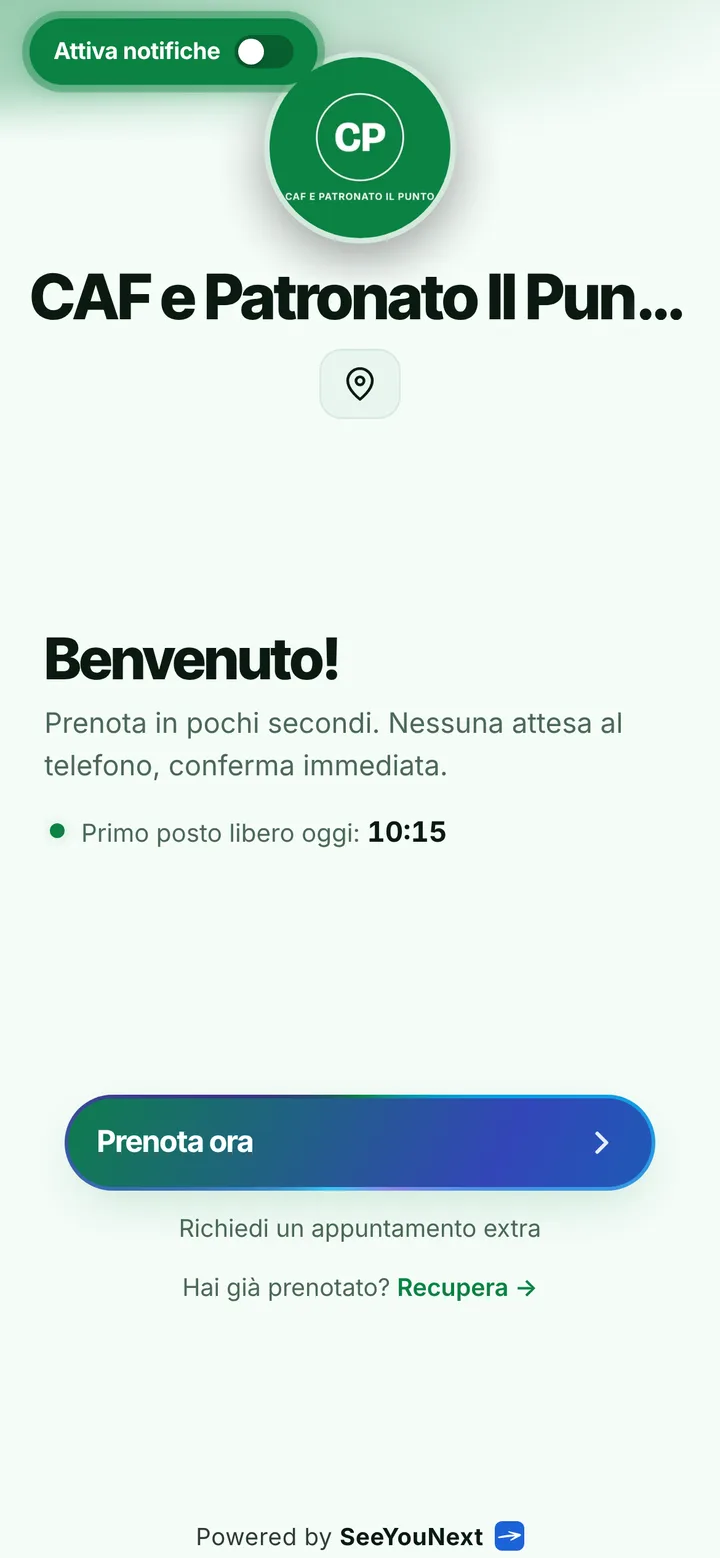
The booking page of CAF e Patronato Il Punto, with logo, photos and the button to book
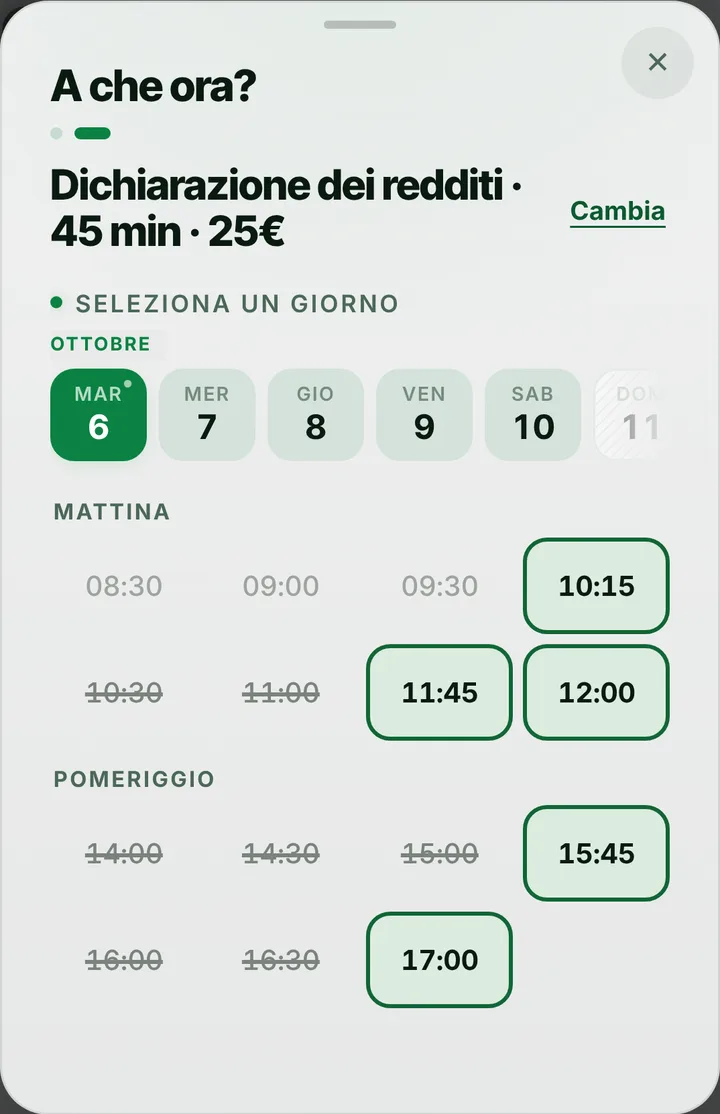
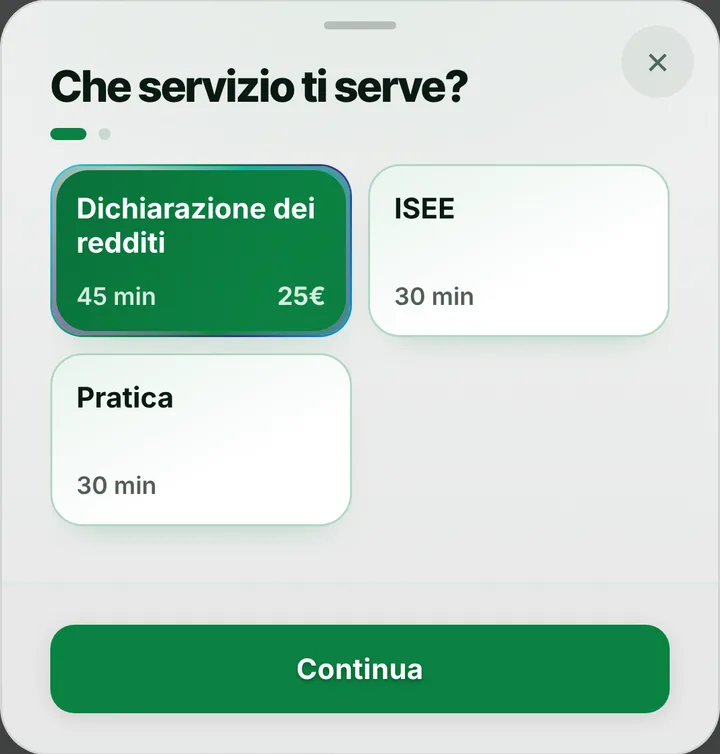
Choosing a service at CAF e Patronato Il Punto, with duration and price
The free slots of the day at CAF e Patronato Il Punto
  1. Opens your link

    From WhatsApp, Instagram or the QR code in your window.

  2. Picks a service

    With its duration and, if you like, the price.

  3. Picks a time

    Sees only the times where it really fits.

For your trade

Tax returns, ISEE and paperwork, without a crowded waiting room.

For tax assistance centres: tax return season, many short appointments, people who phone.

  • Tax return, ISEE, paperwork

    45, 30 and 30 minutes.

  • Documents to bring

    At the top of the page, before booking.

  • Callers

    Add them by voice: say it, check, confirm.

  • May is full

    Waiting list with a notice, for those with notifications on.

  • Several desks

    Every person with their own diary and paperwork.

  • Reminders even without apps

    SMS, WhatsApp or a call, with one tap.

A day, for example

May. Forty-five-minute tax returns all morning, half-hour ISEE in the afternoon. Whoever doesn’t use the internet calls and you add them by voice. At the top of the page, the notice with the documents to bring. Whoever finds it full joins the waiting list.

With one tap

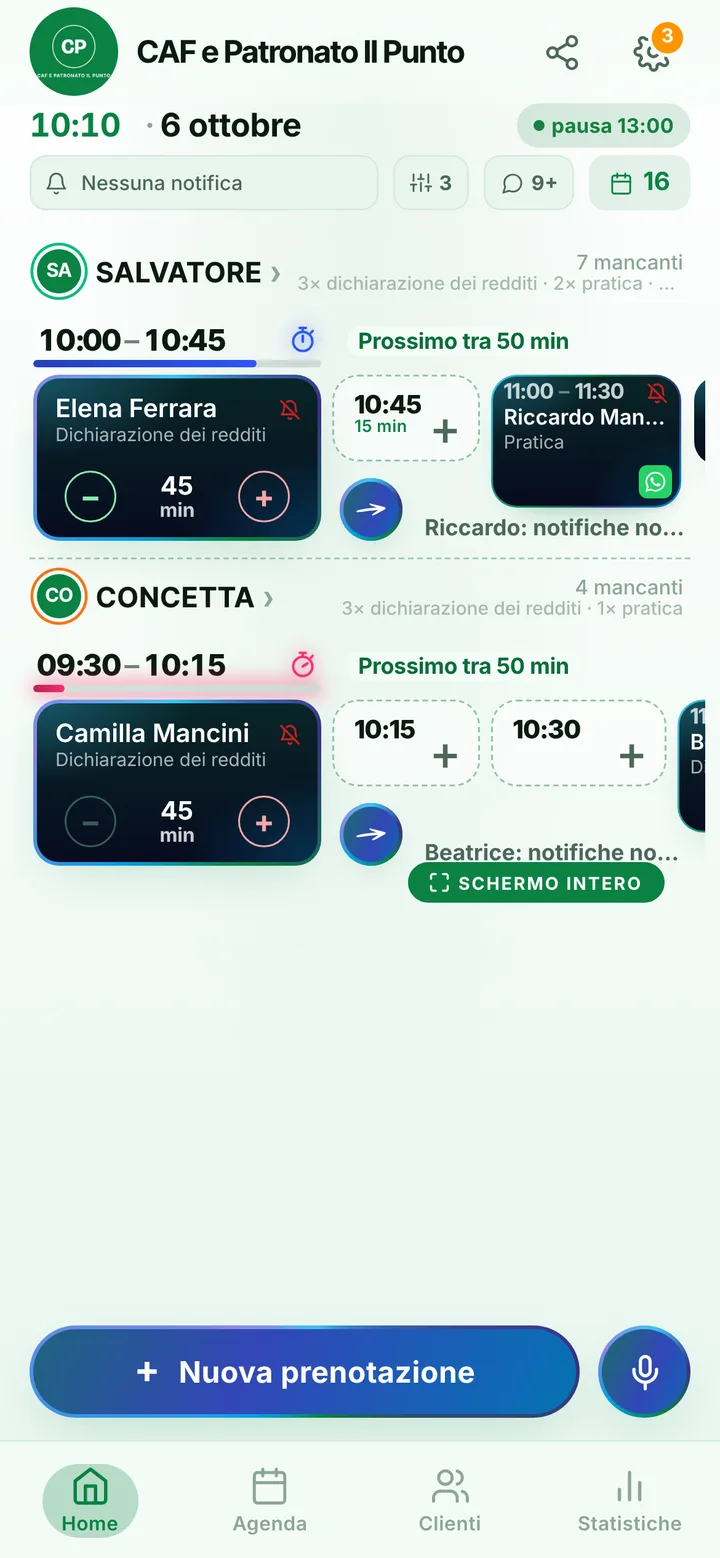
Appointment running long? One tap to let them know.

You mark it on the booking and the client sees the new time on their page right away.

  • Running late

    If they turned on notifications, they also get an alert on their phone.

  • Finished early

    The same tap tells them they can come sooner. Their spot stays guaranteed.

  • WhatsApp

    Reminders and moves go out from your business’s number, with the message already written. No cost.

For you, running things

Cancel, move, alert. No phone calls.

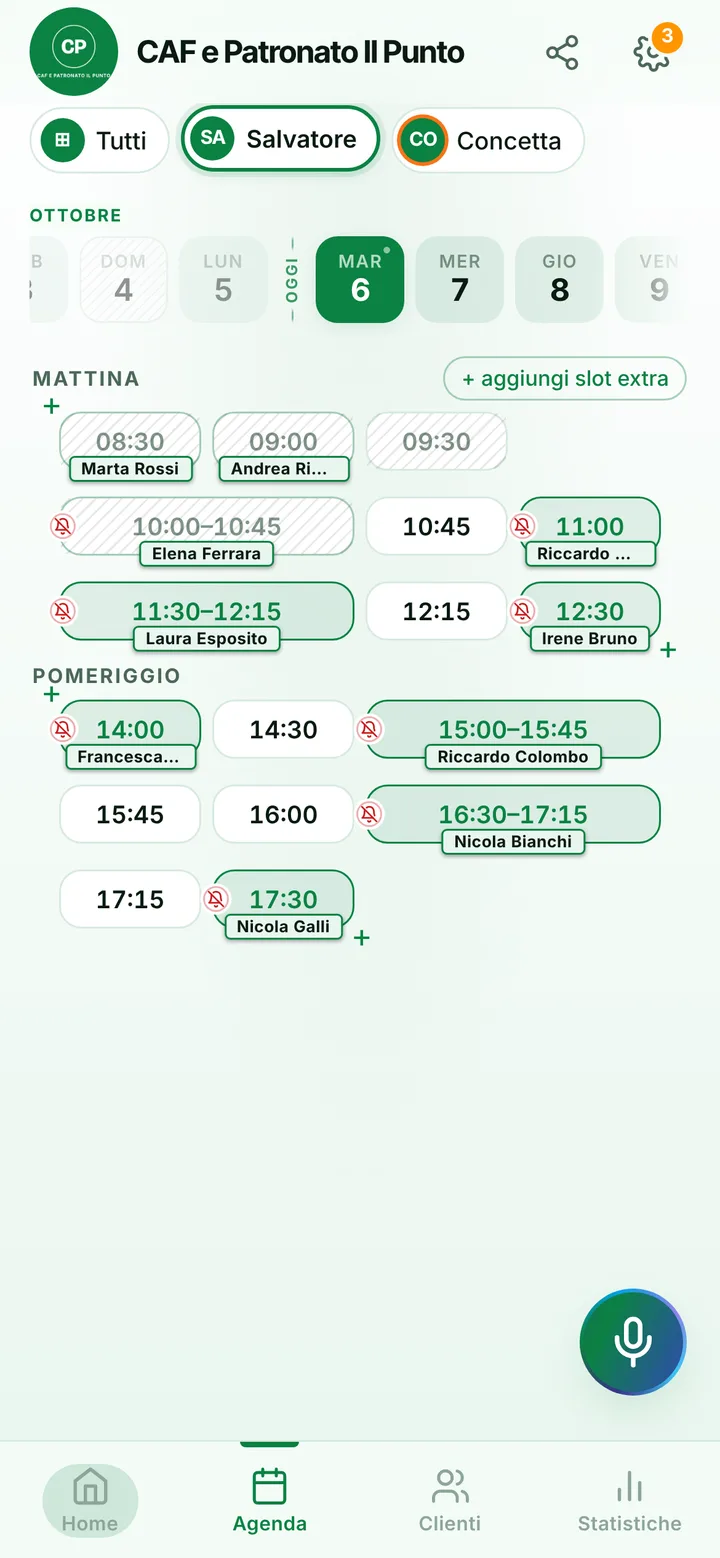
Tap the booking in your calendar and do everything from there.

  1. Cancel

    One tap and the slot is free for someone else.

  2. Move

    Put it in another free slot: the client sees the new time on their page.

  3. Alert

    Delays and early finishes as notifications to those who turned them on, reminders on WhatsApp from your number.

The day’s calendar at CAF e Patronato Il Punto, with booked and free slots

In detail

A tax and welfare assistance desk people can book from one link.

At an Italian CAF spring is a race: everyone wants their 730 tax return, the ISEE income statement expires at year end, and the welfare desk sees people filing benefit claims. Without appointments the waiting room fills at eight and empties by noon. Here is how you spread visitors across desks and weeks, and leave the phone to those who really need it.

Tax return, ISEE and claims

The starting list has three items: a forty-five minute tax return, a thirty minute ISEE and a thirty minute claim. People booking from the link pick the item and only see slots of the right length, so a return full of deductible expenses never lands in a fifteen minute gap. For welfare work keep names generic, such as «Claim», without saying what kind of application it is. In the notice at the top of your page, list what to bring: ID, health card, income statement, pharmacy receipts. Those who arrive with everything in hand leave sooner.

One desk per person

Each member of staff has a diary, working days and the items they handle, up to 12 people in one account: whoever only does ISEE never gets tax returns. Visitors choose who to see, or take the first free slot. During tax season you can open extra Saturday morning slots and close them when the season ends; closed days and holidays are set once. Plenty of people still phone: you put them in the diary yourself, even dictating name and item by voice, while someone is already sitting at the desk.

Reminders for people without a smartphone

Some of the people who come to a CAF never install anything. Those with notifications on get a reminder the day before and two hours before, showing the day, the time and the office name, and can confirm with «I’ll be there». Everyone else hears from you: from the manual reminders list choose WhatsApp, a text or a phone call, one tap each, from the office number. When a case gets complicated and a desk runs late, the delay alert shifts the following appointments down the line, and whoever is still at home knows before setting out.

Freed slots and no-shows

When someone cancels, anyone on the waiting list for that day is told and can take the slot. From the link a person holds at most two active bookings: if a married couple need two returns, you book the second. Anyone who skips an appointment without warning is marked as a no-show, and their next requests wait for your approval. Address book notes are for practical details only, like the number of the son who comes along; income, disability and claim data stay in your CAF software. SeeYouNext does not collect fees.
Pricing

A fixed price. Today it’s free.

Zero commissions on what you earn: you pay a fixed price for your team size, which doesn’t go up with each extra person and doesn’t depend on how many clients you see.

If you join now

Price after the beta: €12 per month

You only pay it once the beta ends, then it stays locked in forever, whatever the size of your team.

Free during the beta

The beta ends in 5 months and 29 days

After the beta, for whoever joins later

How many of you are there?

1 person
  • Solo1 person€12/month
  • Small team2–3 people€19/month
  • Team4–6 people€26/month
  • Large team7–12 people€34/month

1 person. Solo: €12 per month.

Start for free, Beta

We don’t ask for your card. Unlimited clients and bookings.

What you’re wondering.

How do people without a smartphone book?

They call or drop by, and you add them to the diary. You send their reminder with one tap, as a text or a phone call.

Can tax and welfare desks have separate diaries?

Yes: each person has their own items and hours. Whoever handles welfare only receives claims, whoever does returns only gets returns.

Can a family book several tax returns at once?

From the link each person holds at most two active bookings. If more are needed, you add them from the diary.

Can people pay for their claim online?

No: SeeYouNext takes no payments. You handle fees at the desk as you do now.

What do others see in reminder messages?

The notification shows the day, the time and the office name. That is why generic item names, such as «Claim», work best.

What does it mean that SeeYouNext is in beta?

The features on this page are already there and you use them from day one, but we’re still polishing the app together with the people who use it: if something isn’t right, write to feedback@seeyounext.it. Meanwhile it’s free, payments aren’t switched on. When the beta ends, if you start now you pay €12 per month, VAT included, locked in forever, whatever the number of people who work with you.

Hours, price list and your logo, from your phone, in a few minutes. Then send the link.