
Skip to content

Booking app for personal shoppers –

Booking app for personal shoppers

Two hours of shops, set without ten messages.

  • WhatsApp in one tap
  • Live queue
  • Start from your contacts
  • Zero commissions
  • Works with callers too
Start for free, Beta

Lock in your price now

Price after the beta: €12/monthFree during the beta

Then it stays this way forever, for your whole team. Whoever joins after the beta pays up to €34.

The beta ends in 5 months and 29 days

Your page
The client chooses
Your day

Sample business: Personal Shopper Stile Mio

From anywhere

Your client books in three taps.

From their phone, at any hour, without downloading anything or creating an account.

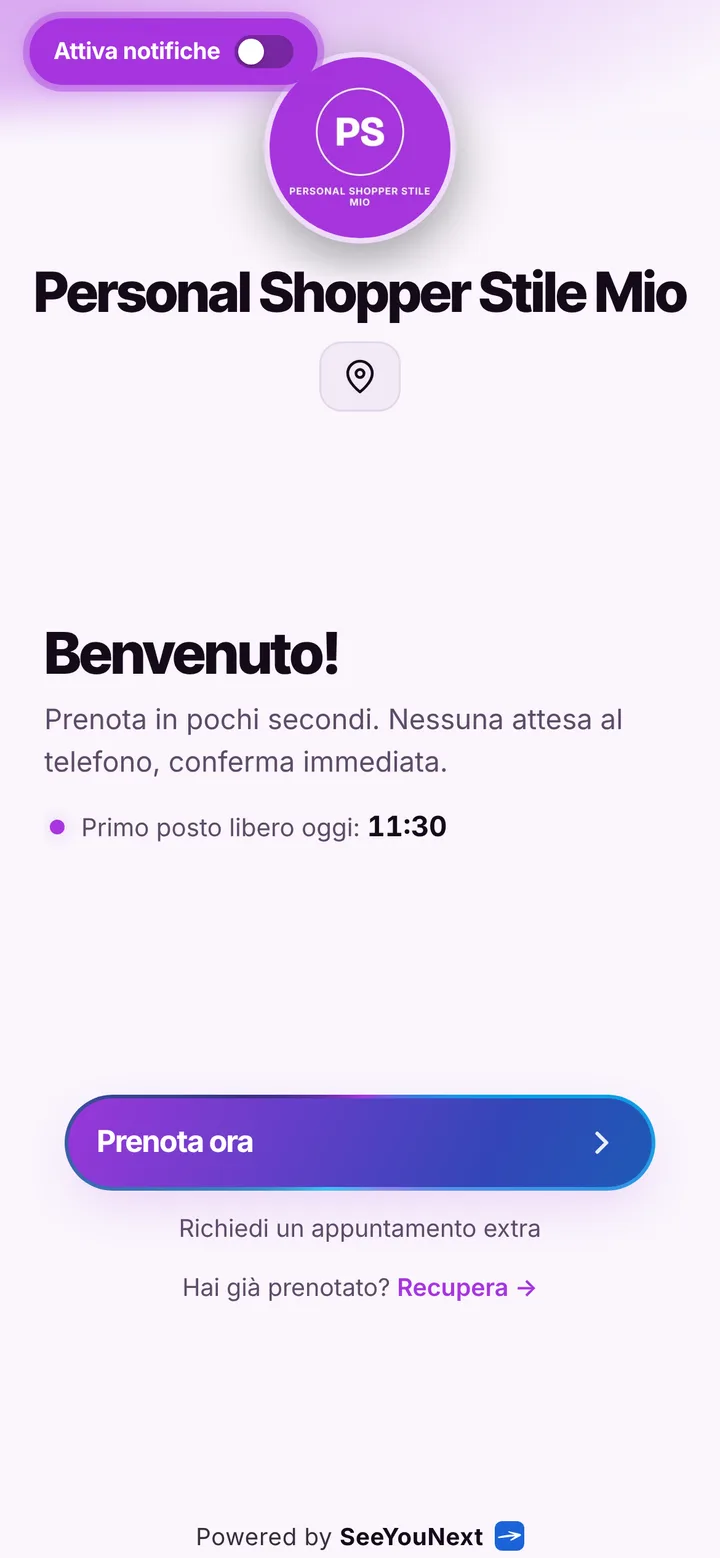
The booking page of Personal Shopper Stile Mio, with logo, photos and the button to book
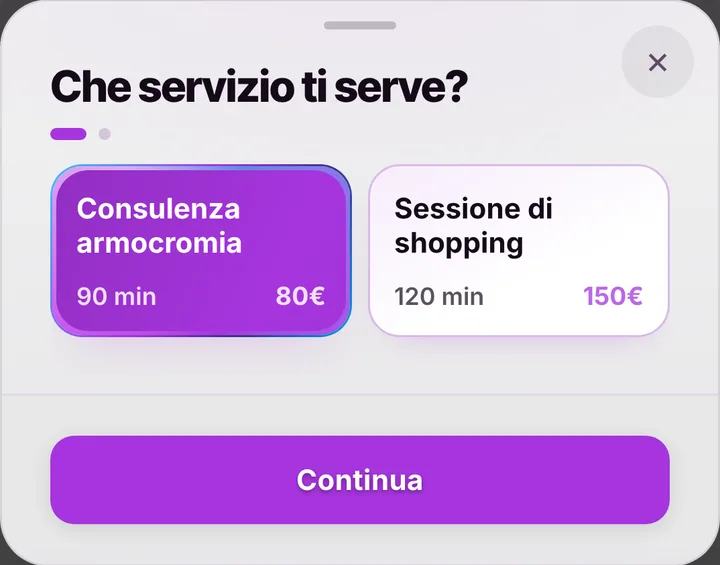
Choosing a service at Personal Shopper Stile Mio, with duration and price
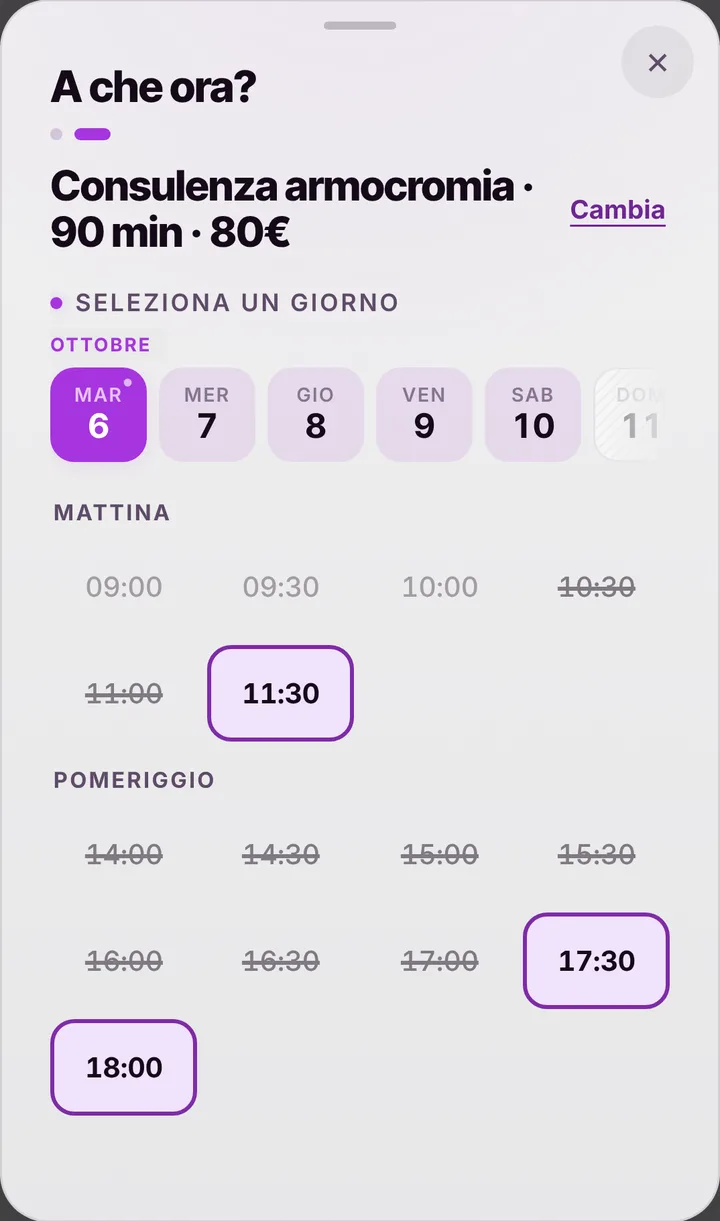
The free slots of the day at Personal Shopper Stile Mio
  1. Opens your link

    From WhatsApp, Instagram or the QR code in your window.

  2. Picks a service

    With its duration and, if you like, the price.

  3. Picks a time

    Sees only the times where it really fits.

For your trade

Shopping sessions and colour analysis, booked from the link.

For personal shoppers: long appointments, in the studio or out, clients from social media.

  • Colour analysis and shopping

    90 minutes and two hours.

  • The meeting point

    Agreed in the note.

  • Sunday

    The client asks for a time outside your hours.

  • From your bio

    Followers book from the link.

  • Your work

    Gallery and social links on the page.

  • Two hours don’t vanish

    You choose the cancellation limit.

A day, for example

Friday. At 10 a 90-minute colour analysis in the studio; at 3 pm a two-hour shopping session in town: the meeting point is in the note. Saturday is full: whoever wants it sends you a request for Sunday.

With one tap

Appointment running long? One tap to let them know.

You mark it on the booking and the client sees the new time on their page right away.

  • Running late

    If they turned on notifications, they also get an alert on their phone.

  • Finished early

    The same tap tells them they can come sooner. Their spot stays guaranteed.

  • WhatsApp

    Reminders and moves go out from your business’s number, with the message already written. No cost.

For you, running things

Cancel, move, alert. No phone calls.

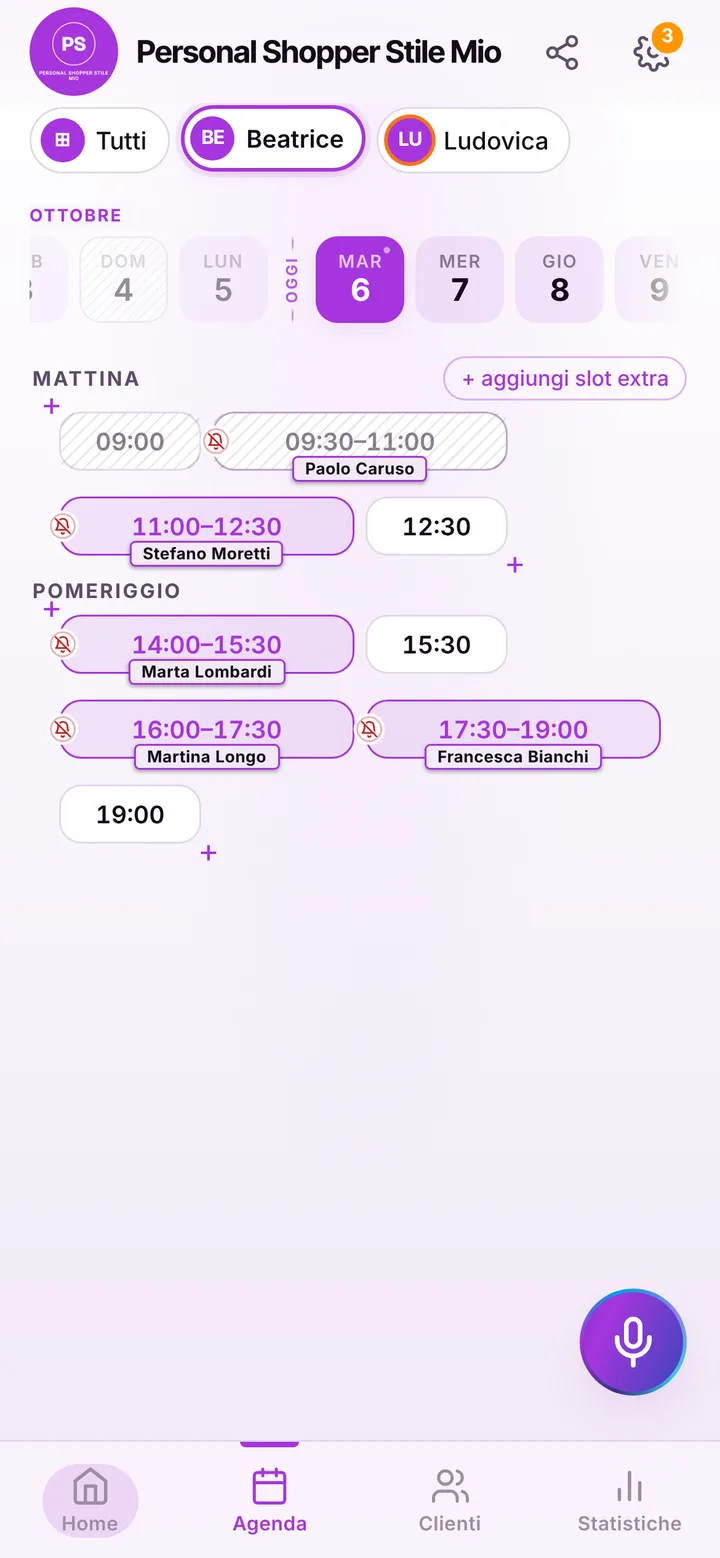
Tap the booking in your calendar and do everything from there.

  1. Cancel

    One tap and the slot is free for someone else.

  2. Move

    Put it in another free slot: the client sees the new time on their page.

  3. Alert

    Delays and early finishes as notifications to those who turned them on, reminders on WhatsApp from your number.

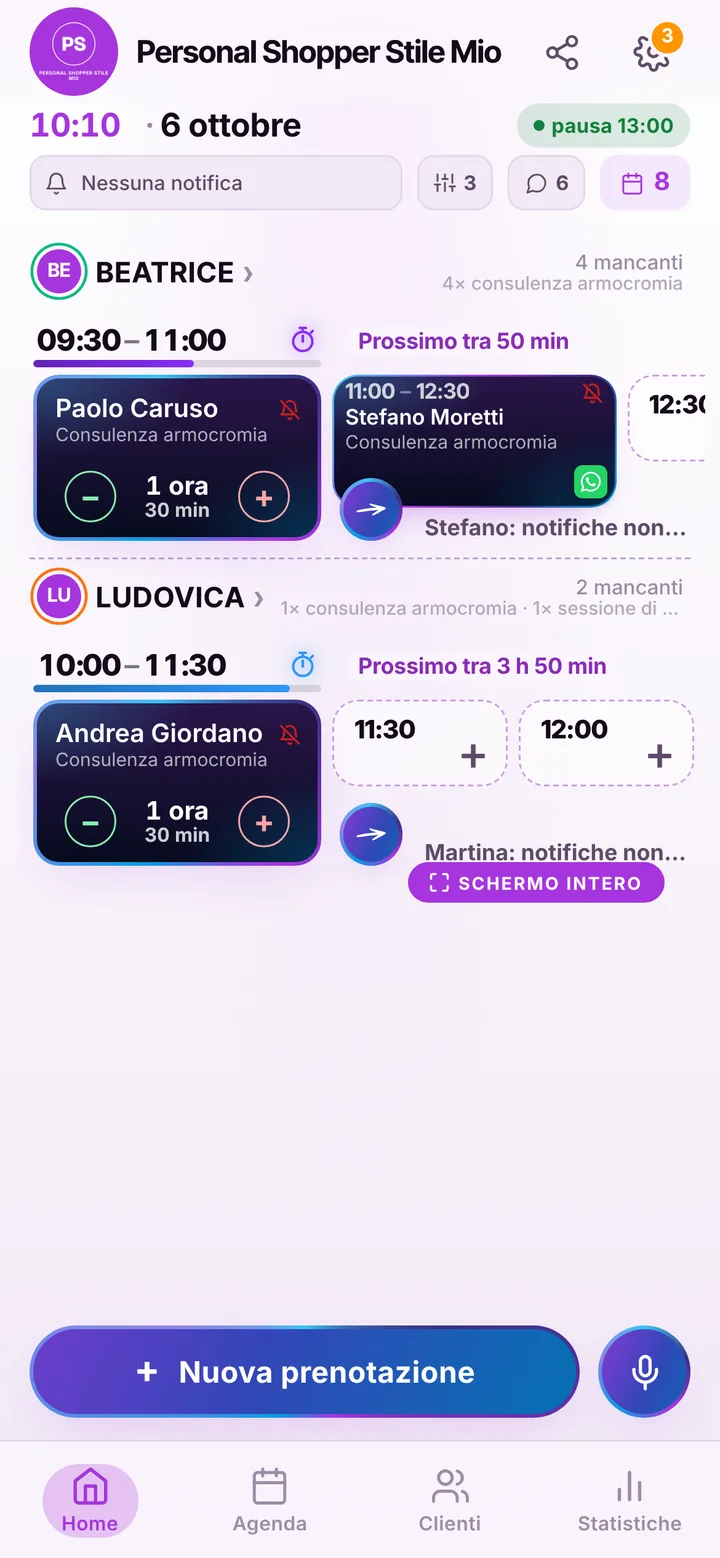
The day’s calendar at Personal Shopper Stile Mio, with booked and free slots

In detail

Personal shopper sessions, set from a link instead of an endless chat.

Being a personal shopper means spending half a day walking boutiques with a client and the other half answering texts asking whether you are free on Thursday. Appointments are long, few and valuable: one missed is an afternoon gone. Here is how you line them up without chasing anyone.

Color analysis and shopping session

Your starting list has two items: a ninety minute color analysis and a two hour shopping session. You can add a wardrobe edit at home, a look for a job interview or a wedding, a remote consultation. Each item has its length and people booking only see afternoons where those two hours really fit, without overlapping another outing. In the note to the business the client describes the occasion, size or budget, so you plan the route through the stores before you meet.

Meeting point and time to move

Often you do not work from a studio but in front of a shop window downtown. Put the meeting place in the notice at the top of your page, or agree it in the note; travel time is not calculated automatically yet, so you add a block in the diary between outings. Lunch, sale days when you only see regulars, holidays: set them once and nobody books over them. The link takes bookings up to sixty days ahead and each client holds at most two open appointments; anything more you schedule yourself.

When an afternoon falls through

For a two hour appointment, a last minute cancellation hurts. You can require online cancellations before a limit you choose, from zero to forty-eight hours ahead. Reminders go out on their own to clients who turned on notifications, by default the day before and two hours before, and include a button to answer that they will be there. For clients without notifications you send it yourself, one tap and WhatsApp opens a ready message from your number. Mark anyone who does not show up, and their later requests wait for your yes. Freed slots go to the waiting list.

Your page, which doubles as a showcase

Put the looks you built in your page gallery, next to your social links; people arriving from your profile find where to book right away. Prices are hidden by default and you show them only if you want. If you work with a colleague, each has a diary and services, up to 12 people, and the client picks who to go out with. It is free during the beta: no booking fees and no payments going through the app, because SeeYouNext does not take money.

Pricing

A fixed price. Today it’s free.

Zero commissions on what you earn: you pay a fixed price for your team size, which doesn’t go up with each extra person and doesn’t depend on how many clients you see.

If you join now

Price after the beta: €12 per month

You only pay it once the beta ends, then it stays locked in forever, whatever the size of your team.

Free during the beta

The beta ends in 5 months and 29 days

After the beta, for whoever joins later

How many of you are there?

1 person
  • Solo1 person€12/month
  • Small team2–3 people€19/month
  • Team4–6 people€26/month
  • Large team7–12 people€34/month

1 person. Solo: €12 per month.

Start for free, Beta

We don’t ask for your card. Unlimited clients and bookings.

What you’re wondering.

Can I say where we meet?

Yes, in the notice at the top of your page or in the booking note. There is no meeting point field yet.

Can the client pay for the session online?

No: SeeYouNext does not take payments. You agree on and collect your fee as you do now.

Can I require a day’s notice to cancel?

Yes: set the online cancellation limit anywhere from zero to forty-eight hours. Past that limit the client has to contact you.

Do long sessions account for travel?

Not automatically: travel time is not calculated. Add a block in the diary between one outing and the next.

Do my clients have to download an app?

No: they open your link and book. Regulars can install your business’s app, with your logo, straight from your page, on Android and iPhone. If they turn on notifications, that’s where reminders and alerts arrive.

What does it mean that SeeYouNext is in beta?

The features on this page are already there and you use them from day one, but we’re still polishing the app together with the people who use it: if something isn’t right, write to feedback@seeyounext.it. Meanwhile it’s free, payments aren’t switched on. When the beta ends, if you start now you pay €12 per month, VAT included, locked in forever, whatever the number of people who work with you.

Hours, price list and your logo, from your phone, in a few minutes. Then send the link.