
Skip to content

Booking app for language lessons –

Booking app for language lessons

Conversation at seven, before the office.

  • WhatsApp in one tap
  • Live queue
  • Start from your contacts
  • Zero commissions
  • Works with callers too
Start for free, Beta

Lock in your price now

Price after the beta: €12/monthFree during the beta

Then it stays this way forever, for your whole team. Whoever joins after the beta pays up to €34.

The beta ends in 5 months and 29 days

Your page
The client chooses
Your day

Sample business: Scuola di Lingue Babel

From anywhere

Your client books in three taps.

From their phone, at any hour, without downloading anything or creating an account.

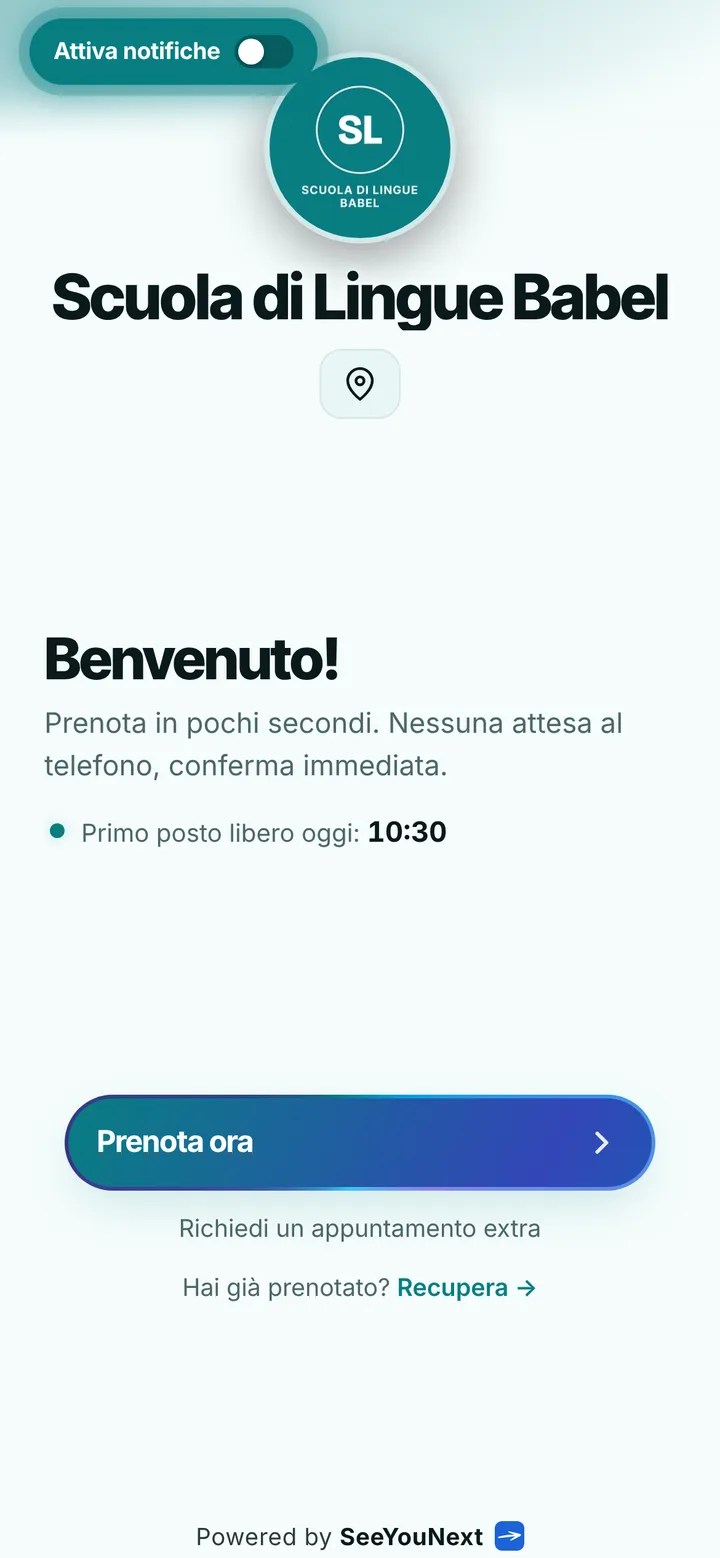
The booking page of Scuola di Lingue Babel, with logo, photos and the button to book
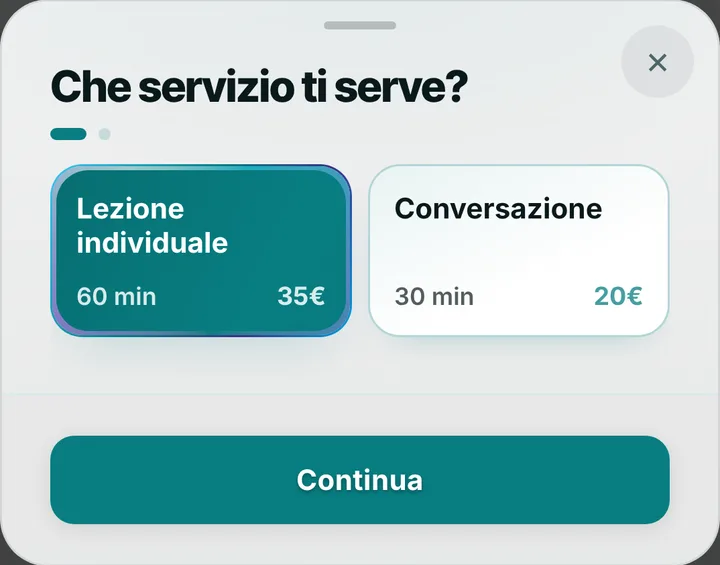
Choosing a service at Scuola di Lingue Babel, with duration and price
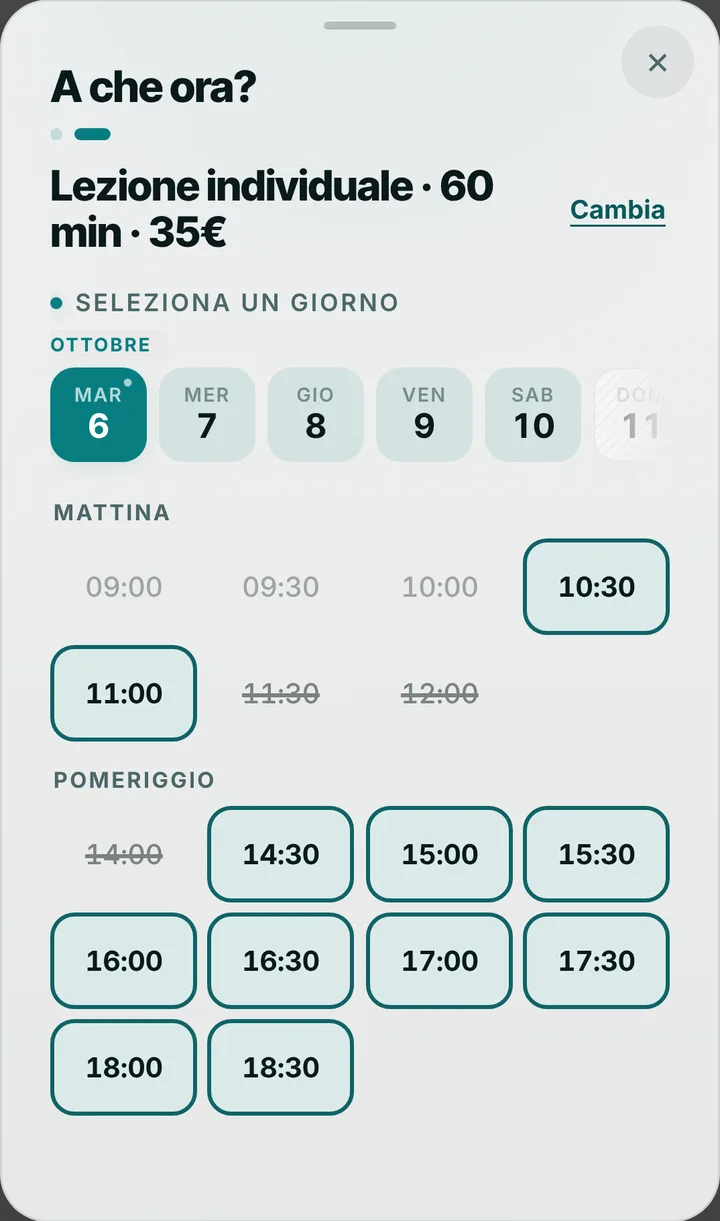
The free slots of the day at Scuola di Lingue Babel
  1. Opens your link

    From WhatsApp, Instagram or the QR code in your window.

  2. Picks a service

    With its duration and, if you like, the price.

  3. Picks a time

    Sees only the times where it really fits.

For your trade

Language lessons and conversation, on schedule.

For language teachers: one-to-one lessons, short conversations, adult learners short on time.

  • Lesson and conversation

    60 and 30 minutes.

  • At lunchtime

    Booked from the phone in a minute, no account.

  • English, German, Spanish

    Every teacher with their own diary and languages.

  • Reminders for those who want them

    As a notification the day before and two hours before.

  • Cancel in good time

    Choose how many hours before students can cancel from their phone.

  • The school’s app

    Students install it from your page with your logo.

A day, for example

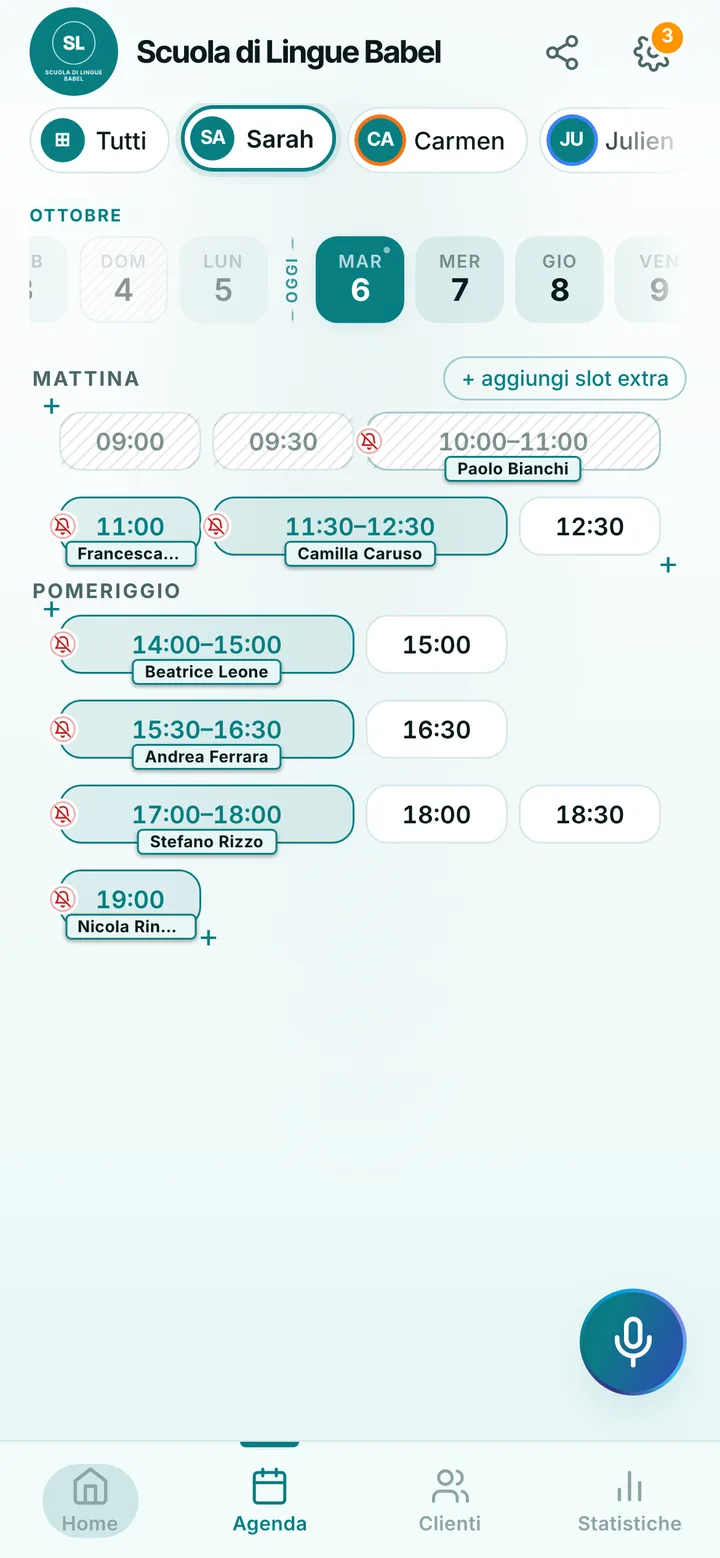
Wednesday lunchtime an office worker books a half-hour English conversation at 1 pm. At 6 an hour-long one-to-one lesson with a student preparing for an exam. The reminder arrives as a notification for those who turned it on; for the others you send it on WhatsApp with one tap.

With one tap

Appointment running long? One tap to let them know.

You mark it on the booking and the client sees the new time on their page right away.

  • Running late

    If they turned on notifications, they also get an alert on their phone.

  • Finished early

    The same tap tells them they can come sooner. Their spot stays guaranteed.

  • WhatsApp

    Reminders and moves go out from your business’s number, with the message already written. No cost.

For you, running things

Cancel, move, alert. No phone calls.

Tap the booking in your calendar and do everything from there.

  1. Cancel

    One tap and the slot is free for someone else.

  2. Move

    Put it in another free slot: the client sees the new time on their page.

  3. Alert

    Delays and early finishes as notifications to those who turned them on, reminders on WhatsApp from your number.

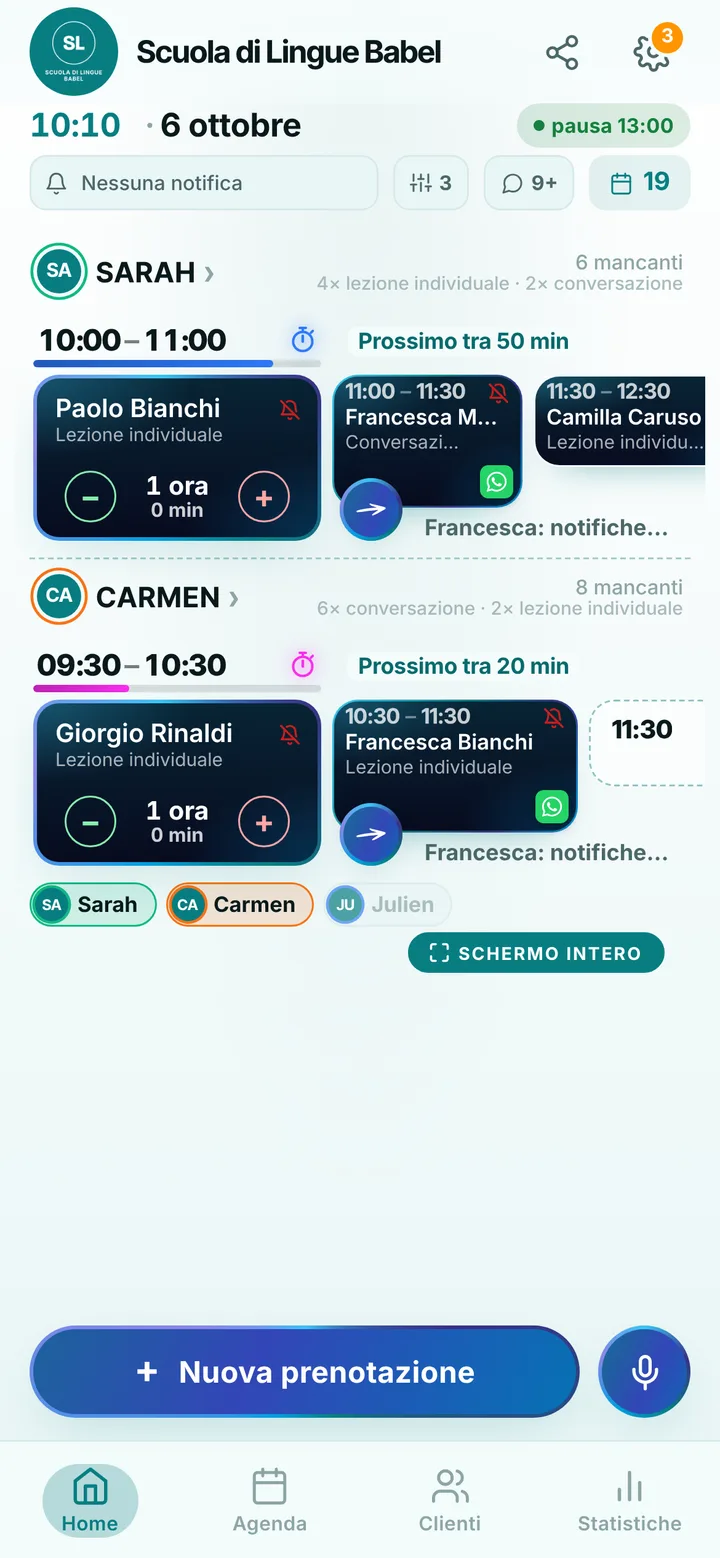
The day’s calendar at Scuola di Lingue Babel, with booked and free slots

In detail

English, Spanish, German: language lessons booked from one link.

Adults learn a language in the gaps their job leaves: lunch break, late evening, Saturday morning. Shifts change, business trips appear at short notice, and the lesson is lost. Here is how a language school, or a teacher working alone, keeps the diary in step with students’ lives without chasing them.

One to one and conversation

You start with two items: a one hour individual lesson and a half hour conversation, for anyone who just wants to loosen up before an interview or a trip. Rename them by language and level, add an item for certificate exam preparation, change the lengths. Students choose from your link and only see the moments when that item really fits your day. Each booking is one lesson with one person: closed group courses with a set number of places stay outside the app for now.

Different native speakers, different diaries

In a school each teacher has their own days and the languages they teach: the German teacher only shows up for people looking for German, her Spanish colleague only for Spanish. Students choose who to talk with or take the first free gap. Up to 12 people in one account, each with their own holidays, which usually mean a flight home: mark them once and nobody books over them. Colleagues join through an invite link.

When work moves the lesson

If a student gets an unexpected meeting, they ask for a new free time from their page, at least two hours ahead: you receive the request and say yes with one tap. You choose how late they can cancel on their own, from zero to forty-eight hours. Reminder notifications reach whoever turned them on, the evening before and two hours before; for the rest you write from WhatsApp with the message already composed, from the school number. Anyone who vanishes without a word gets marked as a no-show.

Teenagers, companies and what stays out

For teenagers preparing a language exam, the parent books under their own name and writes the child’s name in the note. Online each person keeps at most two active lessons; you complete the calendar of an intensive course yourself from the diary. SeeYouNext takes no payments, sells no blocks of hours, and does not send video call links for remote lessons: you share those as you do today. On your page you add classroom photos, the address and a notice, for example about September enrollment.

Pricing

A fixed price. Today it’s free.

Zero commissions on what you earn: you pay a fixed price for your team size, which doesn’t go up with each extra person and doesn’t depend on how many clients you see.

If you join now

Price after the beta: €12 per month

You only pay it once the beta ends, then it stays locked in forever, whatever the size of your team.

Free during the beta

The beta ends in 5 months and 29 days

After the beta, for whoever joins later

How many of you are there?

1 person
  • Solo1 person€12/month
  • Small team2–3 people€19/month
  • Team4–6 people€26/month
  • Large team7–12 people€34/month

1 person. Solo: €12 per month.

Start for free, Beta

We don’t ask for your card. Unlimited clients and bookings.

What you’re wondering.

Can I run group courses with a set number of places?

Not yet for one to one lessons like yours: each booking is one lesson with one person. Group courses you keep handling as today, outside the app.

Can each teacher have their own languages?

Yes: give each person the items they teach. Whoever looks for French only sees the people who teach French, with their hours.

A student wants to book the whole term. Is that possible?

From the link they hold up to two active lessons at a time. You add the later dates from the diary, and the student finds them all on their page.

Do students pay for the course online?

No: SeeYouNext takes no payments and charges no fees on bookings. Fees and receipts stay as you handle them now.

Do my clients have to download an app?

No: they open your link and book. Regulars can install your business’s app, with your logo, straight from your page, on Android and iPhone. If they turn on notifications, that’s where reminders and alerts arrive.

What does it mean that SeeYouNext is in beta?

The features on this page are already there and you use them from day one, but we’re still polishing the app together with the people who use it: if something isn’t right, write to feedback@seeyounext.it. Meanwhile it’s free, payments aren’t switched on. When the beta ends, if you start now you pay €12 per month, VAT included, locked in forever, whatever the number of people who work with you.

Hours, price list and your logo, from your phone, in a few minutes. Then send the link.